

[Nov-2025] Free CSA Exam Dumps to Improve Exam Score
2025 Realistic CSA Dumps Exam Tips Test Pdf Exam Material
NEW QUESTION # 116
Which feature allows you to automate business logic for a particular application or process such as approvals, tasks notifications, and record operations?
- A. Task Flows
- B. Action Sequences
- C. Flow Diagrams
- D. Action Sets
- E. Flows
Answer: E
NEW QUESTION # 117
From the User menu, which actions can a user select? (Choose three.)
- A. Order from Service Catalog
- B. Send Notifications
- C. Impersonate Users
- D. Log Out ServiceNow
- E. Approve Records
- F. Elevate Roles
Answer: C,D,F
Explanation:
TheUser Menuin ServiceNow is accessible from the top-right corner of the interface by clicking on the user's avatar or name. This menu provides various options that allow users to manage their sessions, roles, and impersonation settings.
The three correct actions a user can select from the User Menu are:
TheLog Outoption allows users to end their session and securely exit ServiceNow.
It is an essential feature for security and session management.
Location:User Menu > Log Out
Users with appropriate privileges (such as administrators) canelevate their rolesto gain temporary access to higher permissions.
This is primarily used when a user needs elevated access (e.g.,security_admin) to perform specific administrative actions.
Location:User Menu > Elevate Roles
Example:
A system administrator can elevate their role tosecurity_adminto access security-related configurations.
TheImpersonate Userfeature allows an administrator to act as another user without needing their credentials.
This is useful for troubleshooting, testing permissions, and verifying user-specific configurations.
Location:User Menu > Impersonate User
Example:
An admin impersonating a regular user can verify that the correct permissions and UI settings are applied.
1. Log Out ServiceNow (Correct)2. Elevate Roles (Correct, for Admin Users)3. Impersonate Users (Correct, for Admin Users) Why the Other Options Are Incorrect:A. Send Notifications (Incorrect) The User Menudoes notinclude an option to send notifications.
Notifications (emails, push notifications, SMS) are managed through:
System Notification > Email > Notifications
Outbound SMS or Messaging Settings
E: Order from Service Catalog (Incorrect)
Users can order items from theService Catalog, butthis action is not available from the User Menu.
Instead, users access the Service Catalog through:
Self-Service > Service Catalog
Requests and Catalog Items pages
F: Approve Records (Incorrect)
Users canapprove recordsif they have approval roles (e.g.,approver), but this action is not directly available from theUser Menu.
Approvals are managed through:
My Approvalsin Self-Service
The Approvals module in theServiceNow application navigator
References:ServiceNow CSA Documentation: User Menu Overview
ServiceNow CSA Learning Path: User Menu and Elevate Roles
ServiceNow Docs: Impersonate Users in ServiceNow
NEW QUESTION # 118
Which of the following is used to initiate a flow?
- A. An Event
- B. A spoke
- C. A Trigger
- D. Core Action
Answer: C
Explanation:
InServiceNow Flow Designer, aTriggeris used toinitiateaflow. Triggers define the conditions under which a flow starts and can be based on various system events, schedules, or user actions.
(A) A Trigger - Correct
Triggers are the starting point of a flowin Flow Designer.
A flow will not execute unless a trigger condition is met.
Types of triggers include:
Record-based triggers(e.g., when a record is created, updated, or deleted) Scheduled triggers(e.g., run at a specific time or interval) Application-specific triggers(e.g., Service Catalog request submission) (B) Core Action - Incorrect Core Actionsare predefined actions that execute tasks within a flow, such as:
Sending notifications
Updating records
Calling APIs
They aresteps within a flow,notwhat initiates it.
(C) A Spoke - Incorrect
A spokein Flow Designer is a collection of actions and subflows related to a specific application or integration (e.g., ServiceNow ITSM Spoke).
Spokescontain actionsbut donotinitiate flows.
(D) An Event - Incorrect
Eventsin ServiceNow trigger Business Rules, Notifications, and Script Actions, but they arenot directly used to initiate flowsin Flow Designer.
However, aflow can be triggered based on an event, but the event itself is not the trigger-the flow's trigger is configured to listen for the event.
Explanation of Each Option:
Triggers should be well-definedto prevent unnecessary flow executions that might impact performance.
Use Scheduled Triggersfor time-based workflows (e.g., daily reports).
Record Triggersare commonly used for automation within ITSM processes.
Debugging Triggers: Use theFlow Execution Detailspage to troubleshoot trigger execution.
Additional Notes & Best Practices:
ServiceNow Docs: Flow Designer Triggers
https://docs.servicenow.com
ServiceNow Community: Best Practices for Flow Designer Triggers
https://community.servicenow.com
References from Certified System Administrator (CSA) Documentation:
NEW QUESTION # 119
Which system property is added and set to true in order to see impersonation events in the System Log?
- A. glide sys log_jmpersonabon
- B. glide sys all_jmpersonation
- C. glide sys admin_login
- D. glide.impersonation_setting
- E. glide user_setting
Answer: A
Explanation:
InServiceNow, impersonation allows administrators toact as another userto troubleshoot, test permissions, or verify user experiences.
Tolog impersonation eventsin theSystem Log, the system property:
CopyEdit
glide.sys.log_impersonation
must beaddedand set totrue(true).
Key Features ofglide.sys.log_impersonation:Logswho impersonated whomin theSystem Log.
Capturestimestamp, user details, and session activity.
Helps withauditing and security compliance.
Navigate toSystem Definition > System Properties.
Search forglide.sys.log_impersonation.
If it doesn't exist, create it:
Name:glide.sys.log_impersonation
Type:True/False
Value:true
Save the property and test impersonation.
How to Enable Impersonation Logging:
A: glide.user_setting #Incorrect
Not related to impersonation logging.
Deals withuser preferences and settings.
B: glide.sys.all_impersonation #Incorrect
No such property exists in ServiceNow.
D: glide.impersonation_setting #Incorrect
Incorrect property name; does not exist.
E: glide.sys.admin_login #Incorrect
Logsadmin logins, not impersonation events.
Why Other Options Are Incorrect?
Impersonating Users in ServiceNow
System Logs & Impersonation Tracking
Official ServiceNow Documentation Reference:
NEW QUESTION # 120
On Access Control Definitions, what are ways you can set the permissions on a Table?
Choose 3 answers
- A. Conditional Expressions
- B. Script that sets the answer variable to true or false
- C. Groups
- D. Roles
- E. CRUD
Answer: A,B,D
Explanation:
InServiceNow Access Control Definitions, permissions for a table can be set usingAccess Control Rules (ACLs), which define who cancreate, read, update, and delete (CRUD)records. Permissions can be applied using:
Roles
Roles(sys_user_role) control access by grouping users with similar permissions.
Example: An ACL rule can specify that only users with theitilrole can view incidents.
Script that sets the answer variable to true or false
Customscripts(written in ACL conditions) determine access dynamically.
Example: A script may check if the logged-in user is therecord's assigned userbefore granting permission.
Conditional Expressions
Conditional expressions allowrule-based accesswithout scripting.
Example: A condition like"Assigned to is the current user"can be used to restrict access.
A). Groups
Access Control Rules are applied based onroles, not groups. While roles can be assigned to groups, ACLs do not directly use groups.
B). CRUD
CRUD (Create, Read, Update, Delete) isnot a method of setting permissionsbut rather theactionsthat ACLs control.
Reference:ServiceNow CSA Documentation - Access Control Rules & ACL Conditions ServiceNow Official Documentation - Defining Table-Level Security(https://docs.servicenow.com) Finala answer: C, D, E (Roles, Script that sets answer variable, Conditional Expressions)
NEW QUESTION # 121
When a user reports that they are not able to see modules on the application navigator, what can you do, to see what modules are visible to them?
- A. Look up their password, so you can login with their account
- B. Impersonate the user
- C. Initiate a Connect Chat session
- D. Launch a NowChat window
- E. Install the Bomgar plug-in
Answer: C
NEW QUESTION # 122
On a form, which type of Geld has this icon which can be clicked, 10 S00 a preview of the associated record?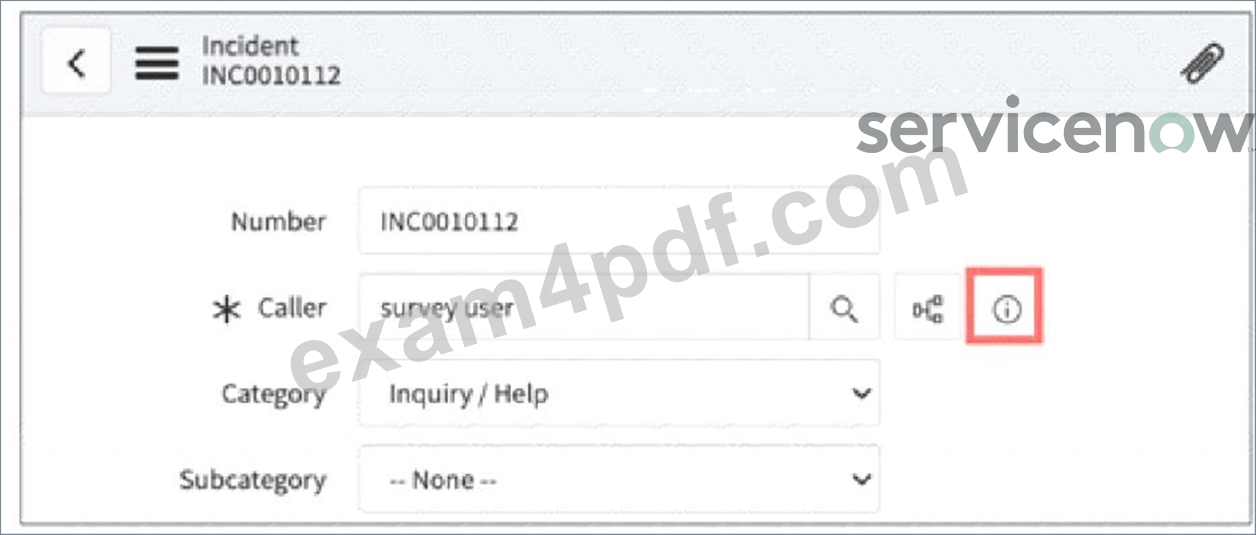
- A. Drilkdown
- B. Preview
- C. Snapshot
- D. Lookup
- E. Quickview
- F. Reference:
Answer: F
NEW QUESTION # 123
What are the benefits of building flows using Flow Designer? Choose 3 answers
- A. Automatically populates SLA records
- B. Provides IDE for complicated scripting
- C. Provides natural-langauge descriptions of flow logic
- D. Provides built-in libraries /API for complex coding
- E. Supports No-Code application development
- F. Supports easy integration with 3rd party systems
Answer: C,E,F
Explanation:
Explanation
The following are the benefits of building flows using Flow Designer:
C:Provides natural-language descriptions of flow logic: This allows users without programming experience to understand and modify flows, making them more accessible to a wider range of users.
D:Supports No-Code application development: Flow Designer provides a visual interface and pre-built actions that allow users to automate processes without writing code. This can significantly reduce development time and effort.
A:Supports easy integration with 3rd party systems: Flow Designer integrates with a variety of 3rd party systems through the Integration Hub, making it easy to connect your ServiceNow instance to external applications.
Flow Designer offers a low-code/no-code approach to building automation, simplifies complex logic with natural language descriptions, and integrates seamlessly with external systems.
References:
ServiceNow Product Documentation: Exploring Flow Designer
- https://docs.servicenow.com/bundle/sandiego-application-development/page/administer/flow-designer/co ServiceNow Community: Flow Designer vs Workflow
- https://www.servicenow.com/community/developer-forum/what-are-the-advantages-and-disadvantages-b
NEW QUESTION # 124
Which one of the following is the correct Link Type to select when creating a module which opens the Record Producer Ul for a user rather than the ServiceNow form UI?
- A. Content Page
- B. Script (from Arguments:)
- C. URL (from Arguments:)
- D. HTML (from Arguments:)
Answer: C
NEW QUESTION # 125
Which one of the following is NOT a type of Visual Task Board?
- A. Feature
- B. Guided boards
- C. Freeform
- D. Flexible
Answer: A
Explanation:
InServiceNow,Visual Task Boards (VTBs)provide aKanban-style interfaceto manage and track work. There arethree main typesof Visual Task Boards, but "Feature"is notone of them.
Freeform Board (Valid Type)
Manually created boards wherecards can be moved freelywithout predefined conditions.
Users canadd and organize tasks as needed.
Example: Personal task management.
Guided Board (Valid Type)
Createdfrom a list viewandlinked to a ServiceNow table(e.g., Incident, Change, Task).
Cards on the boardautomatically updatebased on conditions.
Example: Managing Incidents or Change Requests.
Flexible Board (Valid Type)
Similar toGuided Boards, but allows users tomanually reordertasks within lanes.
Offers moreflexibilitywhile still being linked to a data source.
Example: Sprint Planning or ITSM Workflows.
"Feature" is NOT a Visual Task Board type in ServiceNow.
ServiceNow does use the term"Feature"in Agile Development (for tracking high-level product functionalities), but it is not related to VTBs.
Types of Visual Task Boards in ServiceNow:Why is "Feature" Incorrect?
Why Other Options Are Correct?Guided, Flexible, and Freeformare thethree valid typesof Visual Task Boards in ServiceNow.
Visual Task Boards Overview
ServiceNow Visual Task Boards
Types of Visual Task Boards
Creating and Using VTBs
References from ServiceNow CSA Documentation:
NEW QUESTION # 126
On a form, which type of Geld has this icon which can be clicked, 10 S00 a preview of the associated record?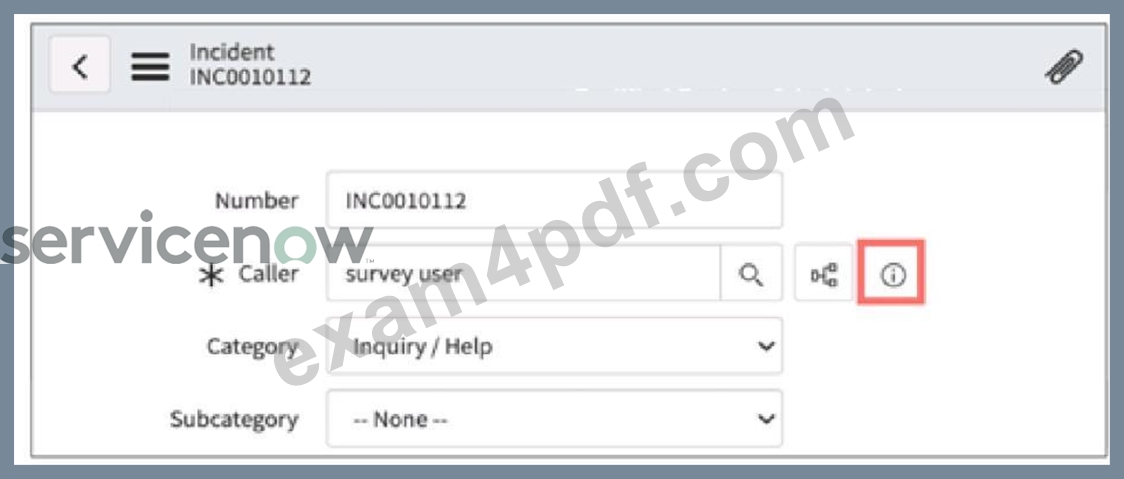
- A. Drilkdown
- B. Preview
- C. Snapshot
- D. Lookup
- E. Quickview
- F. Reference:
Answer: F
NEW QUESTION # 127
What are the main UI component(s) of the ServiceNow Platform?
- A. Banner Navigator
- B. Application Navigator
- C. Content Menu
- D. Content Frame
- E. Banner Frame
- F. Application Frame
Answer: B,D,E
Explanation:
Themain UI components of the ServiceNow platformare designed to provide a structured and user-friendly experience for interacting with the system. These core UI elements include:
Banner Frame- Displays key information such as the logo, user profile, settings, and global search.
Application Navigator- Provides access to different modules and applications within ServiceNow.
Content Frame- Displays the main content area where users interact with forms, lists, and dashboards.
A: Banner Navigator- Incorrect terminology; the correct term isBanner Frame.
C: Application Frame- No such UI component exists in ServiceNow.
E: Content Menu- This is not a primary UI component; the correct term isContent Frame.
Why Other Options Are Incorrect:
ServiceNow Documentation:User Interface Overview
CSA Exam Guide:CoversBanner Frame, Application Navigator, and Content Frameas the three primary UI components.
Reference from CSA Documentation:Thus, the correct answer is:
B: Banner Frame, D. Application Navigator, F. Content Frame
NEW QUESTION # 128
As an IT employee what interface would you use, if you wanted to browse internal IT documentation, like troubleshooting scripts and FAQs?
- A. ServiceNow Wiki
- B. SharePoint
- C. Stack Overflow
- D. Knowledge
- E. Knowledge Now
Answer: D
NEW QUESTION # 129
Which action can be selected to apply pre-defined or custom conditions to filter and generate specified data in the Visualization Designer?
- A. Preview
- B. Execute
- C. Try It
- D. Run
Answer: A
Explanation:
In Visualization Designer, used in the Performance Analytics and Reporting space of ServiceNow, the " Preview" button is used to execute the current visualization setup and show how the filters and conditions apply to your data. This allows the report builder to validate the design without finalizing or publishing it.
* Try: Not an available action in Visualization Designer.
* Execute: More related to scripting or automation contexts.
* Run: Used in reports or scripts but not the specific action in Visualization Designer.
Reference:ServiceNow Docs: Visualization Designer Available from Rome and enhanced in San Diego and later
NEW QUESTION # 130
A manager wants to view a snapshot of month-end Sales performance data, as compared to Sales targets. In addition, the manager wants to be able to see those monthly numbers trended over time, and forecasted into the future. What capability do you suggest for this manager?
- A. Scheduled Reports, a custom snapshot table, and a Projection report
- B. Scheduled Reports, a custom snapshot table, and a Trend report
- C. Key Performance Indicators
- D. Performance Analytics
- E. Scheduled Reports and Excel
Answer: A
NEW QUESTION # 131
What does ServiceNow recommend as a best practice regarding data imports?
- A. Plan time before your import to remove obsolete or inaccurate data.
- B. Adjust your Transform maps, after the data is loaded into the target table.
- C. Monitor data quality and clean imported data, using the Data Scrub Workspace.
- D. Create a new Import set table for each new data load.
- E. Use extremely large Import Sets, instead of multiple large Import Sets.
Answer: A
Explanation:
This is a best practice because it reduces the amount of data that needs to be imported, transformed, and stored in ServiceNow, and improves the data quality and performance of the system1.
ReferencesImport and export resources page
NEW QUESTION # 132
What is the master table that contains a record for each table in the database?
- A. [sys_master_db]
- B. [sys_object_db]
- C. [sys_db_object]
- D. [sys_master_object]
Answer: C
NEW QUESTION # 133
Which field on every record contains a unique identifier for that record?
- A. sys_number
- B. sc_req_item
- C. sys_id
- D. sys_number_id
Answer: C
Explanation:
Detailed Explanation:In ServiceNow, the sys_id field serves as a unique identifier for every record within the platform's database. The sys_id is a 32-character globally unique identifier (GUID) that ServiceNow automatically generates for each record, ensuring that every record is uniquely identifiable and can be referenced across the system. This sys_id is essential for integrations, queries, and relationships between records. (Reference: ServiceNow Documentation - Record Identification and sys_id Field)
NEW QUESTION # 134
A manager wants to view a snapshot of month-end Sales performance data, as compared to Sales targets. In addition, the manager wants to be able to see those monthly numbers trended over time, and forecasted into the future. What capability do you suggest for this manager?
- A. Performance Analytics
- B. Scheduled Reports, a custom snapshot table, and a Trend report
- C. Key Performance Indicators
- D. Scheduled Reports and Excel
- E. Scheduled Reports, a custom snapshot table, and a Projection report
Answer: A
NEW QUESTION # 135
......
Powerful CSA PDF Dumps for CSA Questions: https://www.exam4pdf.com/CSA-dumps-torrent.html
Authentic CSA Dumps - Free PDF Questions to Pass: https://drive.google.com/open?id=18AroLTtkTYCqjOdOkWuI9SCzTq49lauv
